
Choose a Pattern Type
Select from parallel lines, concentric circles, grid mesh, or dot matrix patterns as the base for your moire effect.
Generate and visualize moire patterns in real-time with this free online moire effect creator. Experiment with parallel lines, concentric circles, grids, and dot matrices to create mesmerizing optical interference effects. No signup needed — 100% free, runs entirely in your browser.
Four static examples straight out of the generator above, one for each pattern type. Scroll back up to the generator to change the angle, spacing and colours and watch the interference shift in real time.
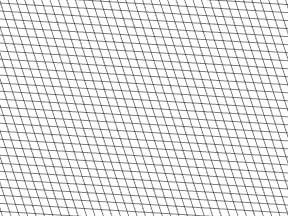
Two sets of straight lines overlaid at a slight angle. The classic moire demo: the smaller the angle, the wider the interference bands spread.
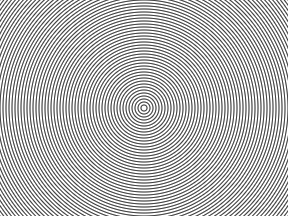
Overlapping ring layers produce a radial interference that fans out from the centre. The most striking of the four pattern types.
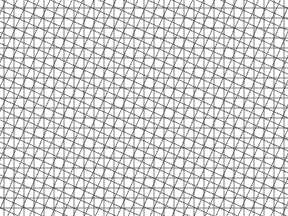
Two square grids rotated against each other create the checkerboard beat you see when photographing screens or fine fabric.
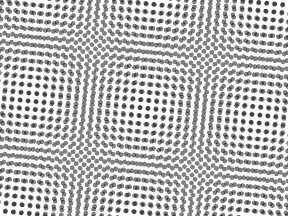
Offset dot screens: the halftone case. This is exactly what causes moire when you scan a printed magazine or newspaper.
Moire patterns are used across design, science, and education for creative and analytical purposes.
Create unique visual textures, abstract backgrounds, and optical effects using moire interference patterns for posters, packaging, album covers, and digital art projects.
Demonstrate wave interference, optical physics, and frequency superposition concepts with interactive, real-time moire pattern visualization in classroom or lab settings.
Generate mesmerizing optical illusion artwork and kinetic design elements by overlapping geometric patterns at precise angles to produce dynamic visual compositions.
A moire pattern is a large-scale interference effect produced when two or more repetitive structures — such as grids, lines, or dot arrays — are overlaid at slightly different angles or frequencies. The resulting pattern is visually distinct from either original layer, often appearing as sweeping curves, concentric ripples, or shimmering bands that seem to move when the viewer shifts perspective.
The word "moire" derives from the French term for a type of watered silk fabric whose manufacturing process creates a characteristic rippled surface. In mathematics, moire patterns are explained through the superposition principle: when two periodic signals with similar but not identical spatial frequencies combine, they produce a beat frequency visible as the large-scale moire fringe.
In digital imaging, moire interference occurs when a camera sensor's pixel grid frequency closely matches a repetitive pattern in the scene — screen pixels, fabric weaves, halftone printing dots, or architectural elements like fences and brickwork. The clash between the two grids generates color banding or wavy artifacts that were not present in the original scene. While photographers typically want to remove moire from photos, designers and scientists deliberately create moire patterns for creative and analytical applications.
Camera sensors sample scenes as discrete pixels. When the sensor resolution closely matches a subject's pattern frequency — such as a striped shirt or an LED display — aliasing produces visible moire fringes in the captured image.
Printed images use halftone dot screens at specific angles. Scanning or re-photographing printed material introduces a second sampling grid, creating halftone moire artifacts that descreening algorithms aim to remove.
Overlaying polarizer films, anti-glare coatings, or protective screens on top of pixel-based displays can produce visible moire when the overlay's physical structure interferes with the underlying pixel grid.
Artists and designers exploit moire for optical illusion art, kinetic typography, security printing (banknote verification patterns), and precision measurement tools like strain gauges that detect sub-pixel deformations.
Create beautiful moire interference patterns with this free online generator.
Select from parallel lines, concentric circles, grid mesh, or dot matrix patterns as the base for your moire effect.
Adjust the rotation angle for each pattern layer. Small angle differences (1-5°) produce the most dramatic moire interference.
Fine-tune spacing, line width, colors, and opacity to create unique interference patterns that match your creative vision.
Enable animation to watch the moire effect in motion. When satisfied, download your pattern as a high-quality PNG image.
Everything you need to create, explore, and understand moire interference patterns.
Generate moire effects with parallel lines, concentric circles, grid/mesh overlays, and dot matrix patterns. Each type produces distinctly different interference results for various creative needs.
See your moire pattern update instantly as you adjust angles, spacing, and other parameters. Zero latency between parameter changes and visual output on the canvas.
Watch mesmerizing moire animations as patterns rotate in real-time. Control animation speed from slow, smooth transitions to fast, dynamic rotations for visual exploration.
Control every aspect of your moire pattern: independent rotation angles for both layers, spatial frequency, line width, foreground and background colors, and layer transparency.
Download your moire pattern as a high-quality PNG image at 800x600 resolution. Perfect for presentations, graphic design projects, educational materials, or digital artwork.
All rendering happens client-side in your browser using the HTML5 Canvas API. No file uploads, no server processing, no account registration required. Completely free to use.
Common questions about moire patterns and how to use this generator tool.
A moire pattern is a visual interference effect that occurs when two repetitive patterns (like grids, lines, or dots) overlap at slightly different angles or frequencies. This creates a new, larger-scale pattern that appears to shimmer or move. The word 'moire' comes from a type of textile traditionally made with a rippled appearance.
This tool renders two identical layers of geometric patterns on an HTML5 canvas. By adjusting the angle between the two layers, you create optical interference that produces moire patterns. The entire rendering happens in your browser using the Canvas 2D API — no server processing or uploads needed.
The strongest moire effects occur when: 1) The angle difference between layers is very small (1-5 degrees), 2) The pattern spacing is tight (lower frequency values), 3) Line width is thin relative to spacing. Try parallel lines at 0° and 3° with tight spacing for a dramatic result.
Yes! Patterns you generate with this tool are your own creation and are free to use for any purpose — commercial or personal. Use them for graphic design, presentations, educational materials, art projects, or any creative work.
If you have unwanted moire patterns in your photographs (from screens, scans, or fabric), our AI Moire Pattern Remover can automatically detect and remove them while preserving image quality. It works on screen photos, scanned documents, and fabric photography.
Moire patterns appear in photography when the camera sensor's pixel grid interferes with repetitive patterns in the scene — such as screen pixels, fabric weaves, or printed halftone dots. The two overlapping grid patterns create visible interference artifacts. For a deeper explanation of the science, see our guide to understanding moire patterns.
Yes, this tool is 100% free with no limitations. It runs entirely in your browser — no account registration, no credits, no server processing required. Generate and download as many moire patterns as you want.
Our AI-powered moire removal tool eliminates interference patterns from screen photos, scans, and fabric images in seconds.